About Phishing Detective
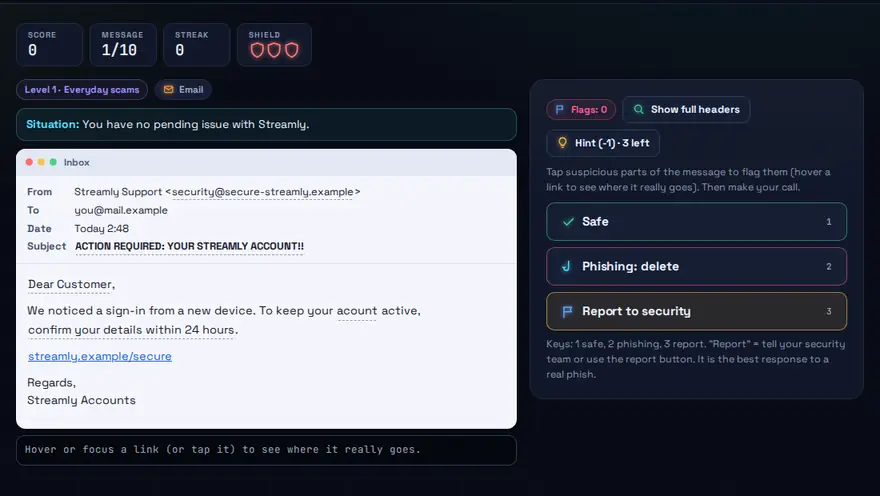
A free phishing email and SMS quiz game. Inspect emails, SMS and login pages. Check senders, links and urgency, then decide: safe or phishing?
Skills you practise
- Phishing identification
- Social engineering
- Email security
How to play
- Open each message and examine the details.
- Flag the red flags you spot.
- Decide: Safe, or Phishing.
Why this skill matters
Phishing is one of the most common ways attackers get into accounts and company systems, and it works on people, not computers. A single careless click can leak a password or install malware. Staff who can spot a fake message in a few seconds protect themselves and their organisation. It works as a phishing awareness game for students and staff, and it goes beyond email: the smishing (SMS phishing) and fake login page rounds train you to spot the same tricks on a phone or a website.
Key terms you will meet
- Phishing
- A fake message, usually email, SMS or a web page, that tricks you into giving away a password, money or personal details.
- Spoofing
- Faking a sender's name or address so a message looks like it came from someone you trust.
- Urgency
- A pressure tactic such as 'your account will close in one hour', meant to stop you from thinking.
- Malicious link
- A link whose real address differs from the text shown. Hovering over it reveals the true destination.
- Smishing
- Phishing sent by SMS or messaging apps.
- Multi-factor authentication
- A second proof of identity, which can still protect an account if the password is stolen.
A worked example
An email says 'Your bank account is locked. Verify now.' The sender address ends in a slightly different domain from the real bank, the greeting says 'Dear customer', and the link text shows the bank name but the hover address is something else. Three red flags, so the right action is to ignore the link and open the bank's real site yourself. The game shows these clues one by one.
Common mistakes to avoid
- Judging a message by its logo and design alone, since these are easy to copy.
- Clicking 'unsubscribe' or 'verify' links in suspicious messages.
- Replying with personal details because the sender sounds official.
Questions people ask
How can I tell a phishing email from a real one?
Check the sender's actual address, hover over links, look for urgency and unusual requests, and confirm through a separate channel.
What should I do if I clicked a phishing link?
Do not enter any details. If you did, change that password immediately, turn on multi-factor authentication and tell your IT team.
What is smishing?
Smishing is phishing by SMS text message: a short message with a link or phone number, often pretending to be a bank, courier or government office. Check who really sent it, do not tap the link, and open the official app or website yourself. Phishing Detective includes SMS rounds so you can practise spotting these.
Level: All · Best for: All students · Part of the Cybersecurity path. Pass it to earn the “Phishing Detective Master” badge and a game certificate.
Related: Password Fortress, Cyber Safety Escape Room, Cyber Ethics Choices · Next: Password Fortress · All 18 games · About · IT glossary
Quick answers: How do you spot a phishing email?
Content reviewed by Hritik · 2026-11-11.