About Excel Formula Quest
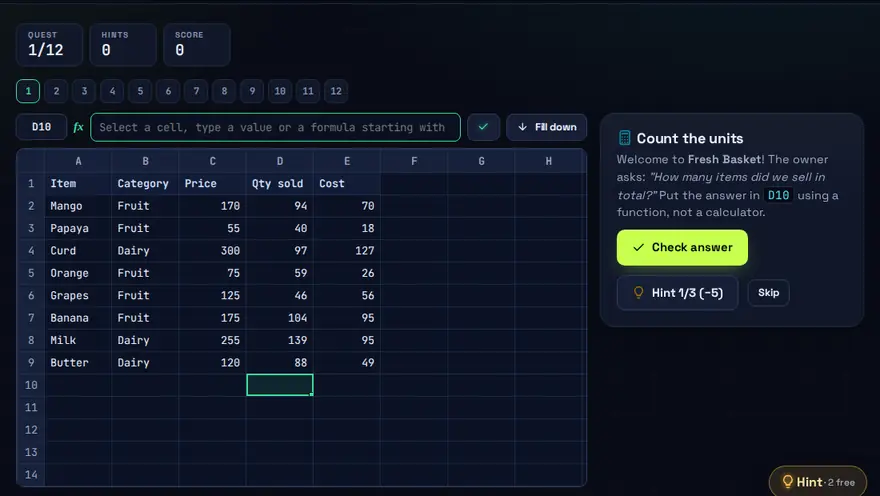
A free Excel formula game with SUMIF, COUNTIF and VLOOKUP. Run a virtual shop. Write real formulas against live sales data to answer the owner's questions.
Skills you practise
- SUM / AVERAGE / IF
- COUNTIF / VLOOKUP
- Charts & reports
How to play
- Read the owner's request.
- Type a formula in the formula bar — it is evaluated for real.
- Finish with a chart that tells the story.
Why this skill matters
Spreadsheets run small businesses, school marks, stock lists and monthly reports. Someone who can write the right formula answers a question in seconds that would otherwise take an hour by hand. The game uses a virtual shop so every formula answers a real question about sales. If you would rather learn Excel formulas by playing than by reading a manual, this gives you practice with the ones offices use most: totals, conditional counts and sums, and lookups.
Key terms you will meet
- Cell reference
- The address of a cell, such as B4. Formulas use references so results update when data changes.
- Relative vs absolute reference
- B4 shifts when copied. $B$4 stays fixed. Mixing them up is a very common error.
- SUM / AVERAGE
- Add up a range, or find its mean: =SUM(B2:B20) and =AVERAGE(B2:B20).
- IF
- Chooses between two results based on a test, e.g. =IF(B2>=40,"Pass","Fail").
- COUNTIF / SUMIF
- Count or add only the cells that meet a condition, for example sales above a target.
- VLOOKUP / XLOOKUP
- Find a value in a table by matching a key, such as the price for a product code.
A worked example
The shop owner asks: how many orders were above 500 rupees, and what is the total for the Mobiles category? You write =COUNTIF(D2:D200,">500") for the first and =SUMIF(B2:B200,"Mobiles",D2:D200) for the second. The game checks your result against live data, then explains why a version without the quotation marks would fail.
Common mistakes to avoid
- Forgetting the = sign, so Excel treats the formula as plain text.
- Not locking a reference with $ before copying a formula down.
- Typing numbers into a formula instead of pointing to cells.
Questions people ask
Should I learn VLOOKUP or XLOOKUP?
Learn the idea with VLOOKUP, since many old workbooks use it, then move to XLOOKUP, which is more flexible in current Excel versions.
What is the difference between SUM and SUMIF?
SUM adds everything in a range. SUMIF adds only the rows that match a condition.
How do I use COUNTIF in Excel?
COUNTIF counts the cells in a range that meet one condition. For example, =COUNTIF(B2:B50,"Paid") counts how many cells in B2 to B50 say Paid. Use SUMIF when you want to add up values that meet a condition instead of counting them. Excel Formula Quest gives you shop data to practise on.
Level: All · Best for: All students · Part of the Office & Productivity path. Pass it to earn the “Excel Formula Quest Master” badge and a game certificate.
Related: File Management Maze, Typing Race, MS Office Speed Challenge · Next: Network Setup Simulator · All 18 games · About · IT glossary
Content reviewed by Hritik · 2026-11-11.